Help Center · User Guide
Ten chapters mirroring the in-app help center — end-to-end guidance from sign-up to final render. Find answers here first.
🚀 Quick Start
What is Aimovie?
Aimovie (by Valzexa) is an infinite-canvas AI video creation platform: create with a node-based workflow on an infinite canvas — script, episodes / storyboard, character sheets, keyframes, video clips, dubbing and composition — confirming each output before the next step. Mobile H5, PC browser and the Windows desktop client share one source, with accounts and data synced in the cloud.
1️⃣ Sign up & log in
Open the online workspace: account + password, SMS codes, plus WeChat / Alipay / Google / X OAuth. 100 free credits on sign-up.
2️⃣ Subscribe to a video plan
Pick any All-in-One or Director plan on the Plans page (video generation needs a Director / All-in-One plan). WeChat / Alipay accepted; Creem / PayPal for foreign currency.
3️⃣ Create a video project
Tap "+ New Video Project" on Home to open the canvas; pick an official pipeline template (Blank / Short Drama / Ads / Previs) to pre-lay nodes, or start from one line with "✨ Idea → Storyboard".
💡 Creation pipeline at a glance: idea → script → episodes / storyboard → character sheets → keyframes → clips → dubbing → compose.
💰 Billing basics: ¥1 = 100 credits. Every AI capability is billed at the actual model price; full transaction history is available.
🧭 Interface Tour
Top-left floating bar
Brand badge + avatar pill; tap the avatar to open your profile card: credits, plan, my video projects, my teams, settings and sign-out.
Canvas empty state & new project
After login, Home is the canvas empty state. The new-project dialog asks for a project name, an official pipeline template (Blank / Short Drama / Ads / Previs), and the owning space (personal or team).
Notifications & announcements
In-app notifications push task completions / failures and credit changes in real time; announcement banners show at the top of the canvas.
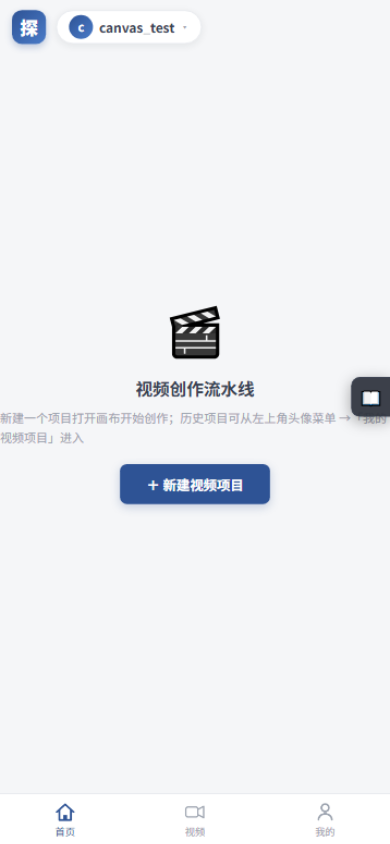
Home · canvas empty state
🎨 Canvas Workspace
Top toolbar
Left to right: Help / Layer toggles ×2 / 🗂 Assets / 🤖 AI Assistant / 🔗 Review / 🖌 Canvas / ▦ Storyboard / ⏱ Timeline / ↻ Refresh / 🧹 Tidy layout; plus "✨ Idea → Storyboard" for a quick skeleton.
Gestures & shortcuts
- Pan: space-drag or middle-drag (drag on mobile); zoom: wheel / pinch
- Box-select, Shift multi-select, Del to delete; double-click a node to configure it
- Right-click menu, ⤢ fit-to-view, ⛶ fullscreen, minimap navigation
Node state colors
Grey = pending / blue = running / green = done / red = failed; failed nodes show the reason and can be fixed and re-run individually without touching other nodes.
Execution: step-by-step and manual
No one-click run — double-click a node to open its dialog, pick a model, confirm the content, then press "Generate this node". Credits are estimated and frozen before running and settled by actual usage afterwards, with the difference refunded.
🧩 Node Types
| Node | What it does |
|---|---|
| 📝 Script | Pipeline start: AI expands your idea or paste a script manually (manual = zero credits) |
| 📚 Episodes | Split the script into 1–5 episodes (title + synopsis); optional for long scripts |
| 🎬 Storyboard | Shot table: duration / characters / visuals / camera / blocking / lines; edit via AI chat, then lay shot nodes in one click |
| 🧑🎭 Character Sheets | Per-character looks (front / side / full-body) referenced by keyframes to keep appearances consistent |
| 🖼️ Keyframes | First-frame art per shot, auto-injecting sheet references and shot descriptions; add prompts and pick sizes |
| 🎥 Video Clips | Image-to-video: keyframe as first frame + sheets as reference; billed per second |
| 🎙️ Dubbing | TTS for all lines; pick models, edit text, auto-mixed at compose time |
| 🎞️ Compose | FFmpeg concatenates clips into the film (burn subtitles / mix audio); the cloud app guides you to the desktop app for final rendering |
| ✂️ Editing | Multi-track timeline node: arrange tracks, then cut the film in track order at compose time |
| 🖼️ Reference Image | Node created by dragging from the asset library; plug into keyframes as style reference |
💡 Billing: text per model token price; sheets & keyframes per image; video clips per second; dubbing per 10k characters; composition (FFmpeg) carries a platform fee. Live per-model prices in the Model Marketplace.
⏱ Timeline Editing
Four steps to a cut
- ① Create an "Editing" node: a multi-track timeline
- ② "⚡ Build tracks from canvas clips": lay finished clips / dubbing onto tracks in storyboard order
- ③ Arrange & preview: playback follows the video track order; audio tracks mix in at compose time
- ④ Compose: cut and concat in track order; multi-platform slice lists are also supported, executed by local FFmpeg
Storyboard & export
The storyboard browses every shot's copy and visuals in table form; export SRT subtitles / CSV shot lists for shooting and post-production.
🔗 Review Collaboration
Client review links · a four-step loop
- ① Create a link from the canvas toolbar "Review" with watermark, expiry and access password
- ② Clients open the link and comment per shot / timecode on the board — no sign-up needed
- ③ Take the collected feedback back to the canvas, fix the matching nodes and rerun
- ④ Send a new version link to compare and confirm
👥 Team Collaboration
From solo to team in three steps
- ① Create a team: the creator becomes the owner
- ② Invite members: by registered username, assigning roles
- ③ Assign projects to the team: pick the team space when creating a project so members share it
Four team tabs
- Members: invite / change roles / remove
- Credit pool: team generations freeze and settle from the pool; admins "transfer from my balance", ledger visible to all
- Approvals: editors submit requests → reviewers and above approve / reject (no self-review), fully logged
- Logs: nine action types — team creation / invites / role changes / projects / approvals / transfers and more — available to the team in the activity log
Five roles & seats
Owner > Admin > Editor > Reviewer > Viewer. Seats follow the owner's plan: 3 on Free, 5 on paid plans, 20 on Studio.
👑 Plans & Credits
Plan overview (8 plans) · live prices on the Plans page prevail
All-in-One plans (full image + video capabilities) — monthly credits = monthly price × 100; yearly = 10× monthly price (2 months free):
| Entitlement | Free | Basic | Pro | Enterprise |
|---|---|---|---|---|
| Monthly (yearly) price | ¥0 | ¥19(¥190) | ¥49(¥490) | ¥199(¥1990) |
| Monthly gift credits | 0 | 1,900 | 4,900 | 19,900 |
| Daily AI calls | 20 / day | 200 / day | 2,000 / day | 20,000 / day |
| Model tier access | 1 Basic | 1 Basic | 1+2 | 1+2+3 |
| Max image resolution | 2048 | 2048 | 2048 | 4096 |
| Max single-video length | 60s | 180s | 600s | 1800s |
| Team seats | 3 | 5 | 5 | 5 |
Director series (video plans with basic image capability — canvas scene art, sheets and keyframes rely on image models):
| Entitlement | Director · Starter | Director · Pro | Director · Flagship |
|---|---|---|---|
| Monthly (yearly) price | ¥299.9(¥2999.9) | ¥999.9(¥9999.9) | ¥3999.9(¥39999.9) |
| Monthly gift credits | 29,990 | 99,990 | 399,990 |
| Daily AI calls | 200 / day | 1,000 / day | 5,000 / day |
| Model tier access | 2 | 3 | 3 |
| Max single-video length | 600s | 1800s | 3600s |
| Team seats | 5 | 5 | 5 |
Studio Team (team collaboration plan):
| Entitlement | Studio Team |
|---|---|
| Monthly (yearly) price | ¥599(¥5990) |
| Monthly gift credits | 50,000 (granted to the owner's account) |
| Daily AI calls | 2,000 / day |
| Model tier / image resolution | 3 / 4096px (All-in-One range) |
| Max single-video length | 600s |
| Team seats | 20 seats |
| Team capabilities | Team credit pool / approval flow / operation logs / team-owned projects |
Where credits come from / how they are spent
- Earn: 100 on sign-up; daily check-in (streak bonuses); automatic monthly plan grants; top-ups; team admins can transfer from personal balance into the team pool
- Spend: estimated credits are "frozen" before generating, "settled" by actual model usage on completion with the difference refunded; failures refund in full (personal projects to the personal account, team projects to the team pool)
- Track: every transaction is in "Credit details"; live per-model prices in the Model Marketplace (platform-maintained, clearly priced)
- Pay: WeChat / Alipay (aggregated); foreign currency via Creem / PayPal, converted at the configured rate
Subscription lifecycle & cancellation
- Expired plans fall back to Free automatically; upgrades apply immediately, downgrades / cancellations take effect at period end
- In-app cancellation: cancels at period end by default (current benefits last until expiry, no further charges), or cancel immediately; cancellation ≠ refund
🪟 Desktop App Guide
Download & install
- Click "Download Desktop" on the official site to get the Windows installer (~89 MB)
- Double-click to run — no dependencies to install
- Win10 1803+ / Win11 ship with WebView2; older systems may need the free Microsoft WebView2 Runtime
Local rendering & billing rules
- The cloud skips final composition by design: composition / slicing run locally in the desktop app while billing stays in your cloud account
- Cloud pre-freeze: credits are frozen when you submit a composition and settled after the film uploads; if the client goes offline for 2+ hours, the cloud auto-refunds
- Auto-update: the client prompts when a new version ships — one click to download and install
Import cloud projects (key capability)
- The web app generates all assets: script, storyboard, keyframes, clips and dubbing
- In the desktop app, enter your cloud account credentials to download the canvas and assets and keep creating and rendering locally
- Then compose locally — the final MP4 is saved on your computer
💡 Recommended workflow: create assets online → import on desktop → render locally. Best of both worlds.
❓ FAQ
Why does the canvas show only a small patch of grid lines?
That was a rendering defect in old versions (the grid was drawn in the wrong coordinate system) and has been fixed: the grid now fills the whole canvas. If you still see it, refresh the page (or press "Refresh" in the toolbar) to load the latest frontend.
It says "Please log in" when I generate?
Tap the avatar pill at the top-left to log in or sign up — 100 free credits on registration.
It says "Plan required"?
Video generation needs a Director / All-in-One plan. Press "Subscribe" in the prompt to open the Plans page — it takes effect as soon as payment succeeds.
Not enough credits / team pool balance?
Personal projects: check in daily, monthly plan grants or top up. Team projects: ask a team admin to transfer from personal balance in "Team → Credit Pool".
What if a generation fails?
Failed tasks cost nothing (the pre-frozen amount is refunded in full: personal projects to the personal account, team projects to the team pool). Fix the parameters and rerun just that node — nothing else is affected.
The model dropdown is empty?
Refresh the page first. If it is still empty, contact support and we will help restore the model list.
It says "Seats full" when inviting members?
Seats follow the owner's plan (3 on Free, 5 on paid plans, 20 on Studio). Upgrade the owner's plan to expand, or remove inactive members first.
Do multiple people editing one team project conflict?
Collaboration is not real-time: everyone sees the same canvas data, and a refresh syncs the latest content. Divide work by claiming nodes and avoid editing the same node at once.
📮 Contact Us
Did not find your answer? Start a live chat with our support team, or submit your question (screenshots welcome) on the feedback page — feature requests are welcome too.
Ready to start creating?
Free credits on sign-up, right in your phone browser — the desktop app renders videos even faster.